
A Mobile Legends ban appeal works better when you first figure out what Moonton is likely reviewing.
Don’t treat every MLBB ban the same way. A cheat flag, a hacked account, a toxicity report, and an account-sharing issue all need different evidence.
First, identify the likely ban type
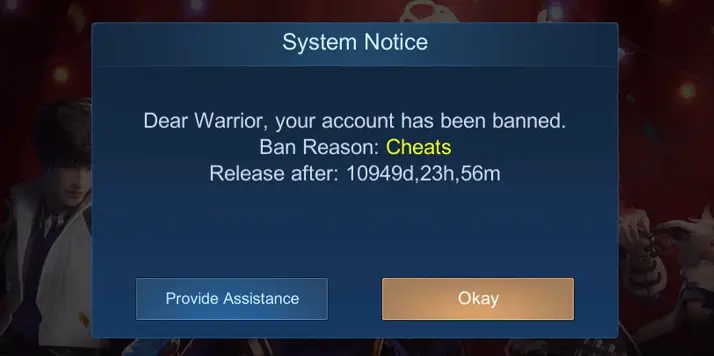
Cheat / plugin / environment flag
Usually linked to:
- maphacks
- scripts
- modified APKs
- skin changers
- overlays
- macros
- bot-like behavior
This is the toughest category.
Account security / compromised account
Common signs:
- login from a different region
- strange purchases
- changed account details
- missing items or diamonds
- sudden lock after suspicious activity
Report-based punishment
Usually tied to:
- toxic chat
- abusive behavior
- repeated reports
- harassment
Account sharing / boosting / trading
Common triggers:
- too many different logins
- unusual play patterns
- account recovery disputes
- boosting or selling-related signals
What usually gets Mobile Legends players banned?
Based on our own appeal dataset, most MLBB bans we see are still tied to cheat-related signals.
- Cheat plugins, bots, maphacks – 67%
- Toxicity – 14%
- Account sharing / boosting – 8%
- Real-money trading – 6%
- Exploit or glitch abuse – 5%
The risky part is that not every case is obvious. Some players were not using full cheats, but still had a suspicious setup around the ban.
That can include:
- modified game files
- third-party tools
- joystick overlays
- emulators plus macros
- repeated VPN or IP switching
- unusual APK hashes
A VPN or emulator does not automatically mean a ban, but it can make a review look worse.
What Moonton usually wants to see
Moonton is more likely to take an appeal seriously when it is built around verifiable account details, not emotion.
The most useful items are:
- UID
- server number
- device model
- OS version
- exact ban date and time
- battle or match IDs
- screenshots of the notice
- purchase receipts
- login-alert emails
- short manual gameplay recording
- IP or travel explanation if relevant
If your notice disappears later, that hurts. Screenshot it right away.
Match the evidence to the case
If it looks like a cheat flag
Send:
- device model and OS
- clean gameplay clip
- match or replay IDs
- exact time of the restriction
- short explanation of your setup
Best angle: show normal manual play and a clean timeline.
If the account was compromised
Send:
- login alert emails
- purchase receipts
- screenshots of unauthorized changes
- dates of suspicious access
- UID and server details
Best angle: prove ownership first.
If it was a toxicity ban
Send:
- the relevant chat context
- match timing
- brief explanation
- apology if needed
Best angle: stay calm and concise.
If it involves sharing / boosting
Send:
- explanation of the access pattern
- ownership proof
- relevant screenshots or messages if someone else used the account
Best angle: remove confusion and explain the timeline clearly.
Before you send the appeal
Do this first:
- screenshot the ban notice
- collect your UID and server
- write down the exact ban date and time
- gather receipts if you ever topped up diamonds
- save login alerts if the account was accessed strangely
- get match IDs from the session closest to the ban
- prepare a short evidence pack before writing anything
This matters because you often do not get many good chances to explain the case properly.
How to Get Unbanned from Mobile Legends
Unlike most other games, the Mobile Legends unban appeal process is a lot easier to fill and submit, as it’s basically just an email address. Thus, here’s how to do so:
- Compose a message from the same e-mail linked to your Moonton account.
- Send to [email protected] (cc: [email protected]).
- Set the subject to “Mobile Legends Ban Appeal”.
- Include your UID, server, and device details.
- Write your ban appeal – include the nature of your ban, why you think it happened and why you think it’s unfair. Or, save time and stress and have us craft the perfect appeal for you!
- Paste your evidence checklist items in clear bullet points.
- Attach screenshots, logs, or receipts, then send.
That’s all there is to it! Hopefully our guide was helpful regarding your banned Mobile Legends account!
What a good MLBB appeal looks like
A stronger Mobile Legends ban appeal usually does 3 things:
- identifies the likely trigger
- gives a short factual timeline
- attaches proof that matches that version of events
A weaker one usually does this:
- sounds emotional
- repeats “I did nothing wrong”
- includes no match IDs, receipts, or account details
- hides unusual setup details that support may already see
Small details that can help
These are easy to miss, but useful:
- include timestamps in a consistent format
- mention travel or mobile-data IP changes if relevant
- mention emulator version if you were using one
- keep attachments organized
- keep the appeal under roughly 500 words
- follow up only after a few days, not immediately
Also, if you removed any third-party tool after the ban, be careful how you mention that. Do not create a worse interpretation by writing too much.
We’re here to give you the best help in order to recover your account!
Get Unbanned!
Comments 17
I don’t cheat on ml I’m just playing well
I Will promise that i will not used any injector skin again
I just delete the mod cuz it’s not working and I install the original one and I open it so I got banned (correct my grammar)
I Will promise that i will not used any injector skin again
My account was banned
My account got banned due to cheats, i’ll admit it that i used some cheats but the cheats that i used are some kind of visual skin or script mod skin,i know to myself that i did the biggest mistake in mylife and that is when i used some cheat.I hope that you can all accept my message apology,because it is the only account that i have, even though i tried to delete it, it still the same account that was banned.I think that my phone cannot accept more accounts in ML because of that.
i got banned by moonton and i realize and i learn from my mistake
I don’t cheat on ml I’m just playing well.
I have a simultaneous matching but i did not do it so i get banned
I just use script skin, I don’t have maphack
I did’t hack but they ban me i don’t know why
Third-party application has been deleted.Please close the application and login the game again! #pls do not use hacking apps while playing mobile legend:bang bang! Your account may be banned permanently
I got banned because of inappropriate chatings
I’m not trashtalking in game I just tell my team to defense tower but they’re stubborn and solo jungle while they play as exp and midlane. I can’t do anything with those players. Honestly I’m not trashtalk in game.
I just use the account that my friend gave to me I didn’t know it was banned
I just use the account that my friend gave to me I didn’t know it was banned
Thank you