
Most MapleStory ban appeals fail before a GM ever reads them. Not because the case is weak – but because of how Nexon’s support system handles repeated submissions. Flood the queue with duplicate tickets and the entire Nexon ID gets blocked from support access, not just the current case. That’s a risk specific to Nexon that doesn’t exist at Riot, EA, or Activision, and it’s the first thing worth understanding before opening any ticket.
One structured appeal, everything attached, submitted once – that’s the only safe approach to getting unbanned from MapleStory.
Why Antivirus Software Creates Real Problems for MapleStory Appeals
Here’s something Nexon documents publicly but most players don’t connect to ban appeals: NGS – Nexon Game Security, the client-side protection layer – gets flagged as malicious by antivirus programs regularly enough that Nexon has a dedicated support article about it. Windows Defender, Norton, McAfee, and others sometimes identify NGS or the Nexon Launcher itself as an unidentified or suspicious program and block it.
When a blocked NGS can’t run properly, it can produce behavior that looks suspicious from the server side – abnormal session data, unexpected disconnects, packet irregularities. Players who got banned in MapleStory after antivirus interference and don’t realize it often write appeals that don’t address the actual cause because they don’t know it happened.
Before submitting a MapleStory ban appeal, check whether NGS or the Nexon Launcher was flagged or quarantined by the antivirus at any point around the ban. If it was, that’s not just useful context – it’s potentially the explanation for the entire flag. Nexon’s own fix is to whitelist the Nexon Launcher at C:\Program Files (x86)\Nexon\Nexon Launcher and add it as a Windows Defender exclusion. Documenting that this happened and that it’s now resolved gives the GM a specific, verifiable cause to investigate.
Skip the Hassle - Get Expert Help Unbanning Your Account!
Get Unbanned!What Each MapleStory Ban Type Needs in the Appeal
Botting and macro flags make up the largest share of MapleStory bans in our own casework – around 46% of cases. MapleStory’s anti-cheat monitors automation, memory edits, and abnormal packet timing. VPN hops during farming sessions are a documented false positive trigger, especially when the IP jump coincides with high-volume gameplay that already looks bot-like from the server side.
Botting false positive or automation flag: A clean system scan dated after the incident is the starting point – it shows what was actually running at the time. Add a written session timeline explaining what was happening in-game when the flag hit: what map, what activity, how long the session had been running. If antivirus interference with NGS was involved – and it’s worth checking, since Nexon documents this happening regularly – note what was blocked, when, and that it’s been resolved through whitelisting. If a VPN was active, a provider invoice or an explanation of why it was running helps frame any IP irregularities.
RMT or meso selling flag: Trade chat context showing the surrounding conversation and an explanation of why the meso movement makes sense without an external payment. Legitimate NX purchase receipts or payment provider help establish that real money wasn’t changing hands outside the game. If the flagged transfer was a gift to another player, explain the relationship and include the surrounding chat – the distinction between a gift and a sale is entirely about context, and Nexon’s GMs need that context in the ticket.
Compromised account: Any email notifications of unauthorized access attempts, password change confirmations, or unfamiliar login alerts are the core of this case. A malware scan showing the machine is clean. Keep the Nexon Launcher closed during the review period – a new login from the same flagged session data while the case is active can extend the penalty rather than help it. If access to the original account is lost entirely, Nexon allows creating a new Nexon ID for support purposes – GMs can locate the banned account through character name and account details.
Toxicity or harassment: Full chat log with the surrounding messages, not just the flagged lines. A concrete acknowledgment of what happened and what’s changed since – specific steps, not a general apology. MapleStory’s GM team responds better to that framing than to arguments about proportionality.
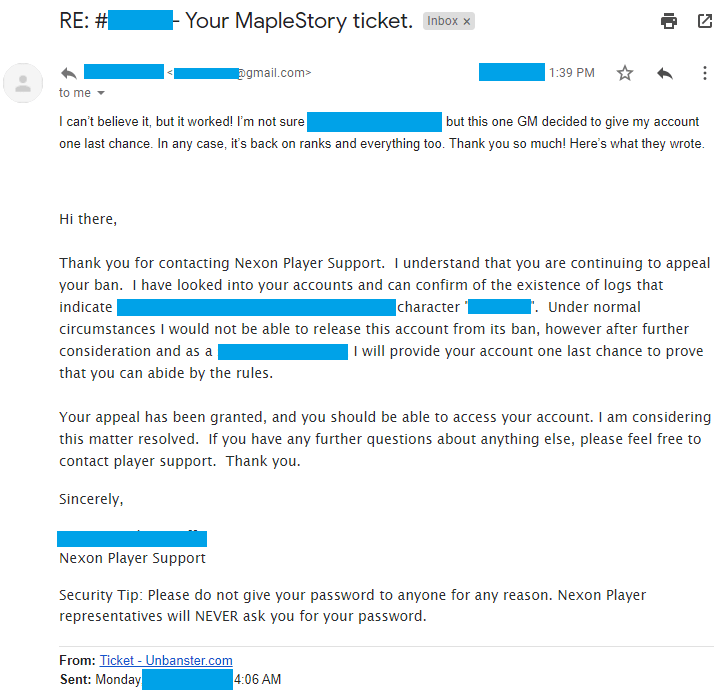
Real outcome from a MapleStory appeal case handled by our team. Personal details removed for privacy.
Case type: Cheating ban appeal
What triggered it: Account was banned after being flagged for suspected cheating activity
What we included: Context-based appeal, timeline clarification, and manual review request
Outcome: Ban removed
The Nexon ID Block Risk – What It Means Practically
This is the detail that separates MapleStory ban appeals from every other game in this space. Nexon’s support system doesn’t just deprioritize duplicate tickets – repeat submissions can block the entire Nexon ID from support access across all Nexon games. That means losing the ability to appeal not just the MapleStory ban, but any other issue across the account.
The practical rules here are stricter than anywhere else:
One ticket at a time only. If there’s no reply after 5-7 days, update the existing ticket with new information rather than opening a new one. Opening a new ticket while the original is still active is the specific behavior that risks the block.
If the Nexon ID is already blocked from support, the only path forward is a single, carefully worded ticket (from a brand new account) that acknowledges the previous submissions and focuses entirely on the original ban. Tone matters more here than in any other category – another aggressive or repetitive submission will close the case without review.
How to Get Unbanned from MapleStory
Here’s how to submit a MapleStory ban appeal:
- Go to the Nexton Support website;
Log into your Nexon account. If that was banned as well, create a brand new one just for Support purposes.
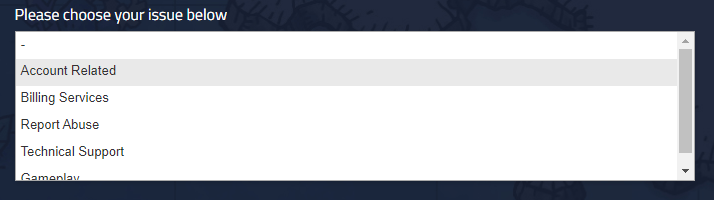
- Choose your issue as “Account related”;
Wait for the form to refresh with the additional fields.

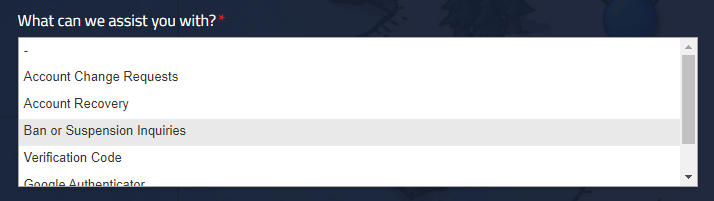
- Pick “Ban or Suspension Inquiries”;
If your MapleStory account was hacked, select “Account Recovery” instead.

- Input your account’s and character’s information;
This is used to better locate your account or isolate the situation. You can skip whichever fields you don’t know, as long as they’re not mandatory.
- Write “MapleStory ban appeal” as the subject;
Or, depending on your situation, you can go with “Account issue” instead.

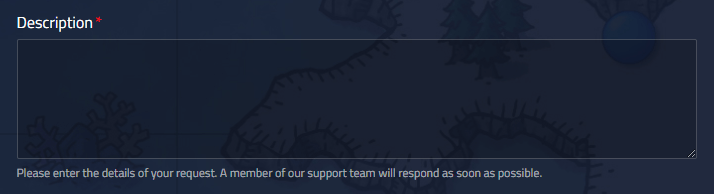
- Write your appeal in the description field.
Keep it under 400 words, provide as much relevant information as evidence as possible. Keep a civil and polite tone, and explain why the ban was wrongfully applied and why it likely happened. Or, you can let us handle it – get a pro-crafted ban appeal now!


Once everything is in place, simply press the blue “Submit” button underneath the form, and your MapleStory ban appeal will be sent to Nexon for review!
You’ll also get noticed via your email address, to make sure to keep an eye on it (as well as on its Spam folder).

Real outcome from a MapleStory ban appeal case handled by our team.
Case type: Cheating ban appeal
What triggered it: Account was treated as a cheating case after a flagged session
What we included: Focused appeal explaining why the flag didn’t match actual gameplay and requesting a re-check
Outcome: Ban removed after review and account reinstated
We’re here to give you the best help in order to recover your account!
Get Unbanned!