
Rust players use the word “ban” for almost everything: an actual anti-cheat hit, a developer-issued restriction, a community-server ban, a blacklisted device message, or a startup failure tied to blocked software. That’s usually where the confusion starts.
If you want to get unbanned from Rust, the first useful move is not writing a long appeal. It is figuring out what kind of restriction you are dealing with, because the next step changes completely depending on the message, route, and trigger.
Start with the message, not the theory
A lot of players jump straight to “I was falsely banned”, but Rust throws several very different EAC and security-related states.
If you see “EAC banned” when trying to join a server, that points to a real Easy Anti-Cheat penalty tied to cheating detection. That’s not the same thing as a connection issue or a broken local install.
If you see “EAC: Disconnected” or “Client Integrity Violation,” you may be dealing with a local anti-cheat problem, corrupted files, or a failed verification state rather than a confirmed cheat ban. Those cases are important because they can look scary, but they do not belong in the same category as a clean anti-cheat enforcement.
If you see “EAC: Blacklisted device”, Rust has a very specific history here: Bloody and A4Tech mice are blocked because of onboard-memory recoil abuse concerns. That’s not the same thing as being caught with a cheat injector, but it still affects whether you can play and what support context makes sense.
If Rust fails to start because of Reshade, that is another separate issue. ReShade has been blocked in Rust since January 13, 2025, and trying to launch with it can trigger a startup error rather than the same flow you would expect from a normal in-match ban.
That distinction matters because bad Rust ban appeals often start from the wrong premise. A weak ticket explains innocence in detail while never clearly identifying what actually happened on the account or device.
Skip the Hassle - Get Expert Help Unbanning Your Account!
Get Unbanned!Rust bans go through different routes
Rust is not just “send a support ticket and hope”. The route depends on who or what issued the restriction.
- EAC-related bans usually follow the anti-cheat route;
- Gameplay or moderation bans usually go through Facepunch support;
- Community server bans stay with that server’s owner or admin team.
If you mix those together, you end up sending the right explanation to the wrong reviewer.
A few Rust-specific details matter more than players think
Some details in Rust are unusually important because players keep misreading them.
One example is crosshair software. In Rust, third-party crosshairs are allowed. So if someone panics because they used a monitor crosshair or a basic overlay crosshair, that detail alone does not carry the same weight as a recoil macro, script, or onboard-memory device issue.
Another is Bloody/A4Tech mouse use. Rust has treated those devices differently for years because of the way onboard memory can be used. If your case involves a blacklisted-device message, the ticket should not read like a generic “I never cheated” appeal. It should explain the device context cleanly and separate it from anything script-related.
Another big one is ReShade. Since it is now blocked in Rust, players should not frame it as if it were a harmless cosmetic tweak that support will ignore. If that software was present, the appeal has to be careful, specific, and honest about what was installed, when it was removed, and whether the problem was a startup block or a gameplay enforcement.
And then there is behavior enforcement. Rust moderation is not only about software. Hate-speech enforcement on Facepunch servers is monitored and reviewed with a much tougher posture than the average player assumes. Context may still matter, but this is not the same kind of appeal as a suspected false anti-cheat hit.
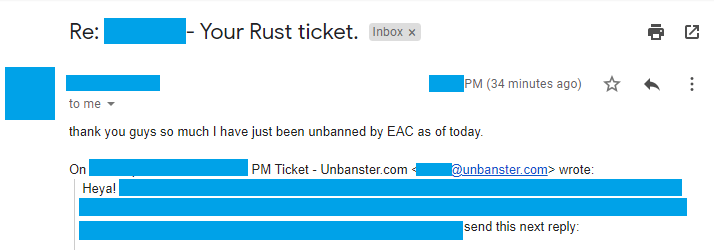
Real outcome from a Rust appeal case handled by our team. Personal details removed for privacy.
Case type: False cheat flag
What triggered it: Account was flagged under EAC
What we included: Clear appeal timeline and focused review request
Outcome: EAC ban lifted and account access restored
What usually helps a Rust ban appeal
The best Rust ban appeals are usually not the longest ones. They are the easiest to review.
That means:
- identifying the restriction correctly,
- naming the exact message shown,
- giving a short timeline,
- attaching the right reference material early,
- and not blending five theories together in one ticket.
For Rust specifically, the useful details often include the F1 console reference ID, EAC-related logs, recent hardware or software changes, Steam account security context, and a clean explanation of what was running at the time.
What tends to hurt the case is overcomplication:
- “I was hacked, maybe mass reported, maybe EAC bugged, maybe my mouse software caused it, maybe a plugin on the server did something.”
- sending a wall of text before naming the actual error,
- attaching random files with no explanation,
- or writing the ticket as if anger will make it more believable.
Rust reviewers don’t need drama. They need a readable story that matches the current status of the account or device.
How to Get Unbanned from Rust
1. Easy Anti-Cheat Rust Ban Appeal
For EAC bans, you need to submit a Rust ban appeal via their EAC Support website. In order to proceed with your appeal, you must first provide a Reference ID of your ban. Here’s how to find it:
- Join any Rust server, press F1 to open the console, then click Log File (bottom-right);
- In the log viewer, use Ctrl + F to search for keywords like
EAC,RESTRICT, or a long hash (-separators). That string is your reference ID.
OR
- Re-launch Rust and join any server; you’ll be kicked again (that’s normal);
- Immediately press F1 – the console shows a line like: [EAC] Active sanction: RESTRICT_GAME_ACCESS appeal at https://easy.ac/support/contact/appeal?referenceId=1234-ABCD-5678
- Copy the long code that follows
referenceId=and paste it into the EAC appeal form.
- Input your ban referenced ID and select “Rust” from the game list then authenticate your account;
You can sign up with Steam or just fill in your Player ID.
- Input your email address;
This email will be used for them to get back to you once they have reviewed your case.
- Choose the appropriate reason behind your Rust ban appeal;
If the ban was wrongfully applied, you can select “I didn’t cheat”. If the ban came as a result of an account compromise, you can go with “Other reason”.
- Write your ban appeal;
Write your appeal; attach EAC logs and any evidence you might have; click Submit appeal. Or, save time and stress and have us craft the perfect appeal for you!

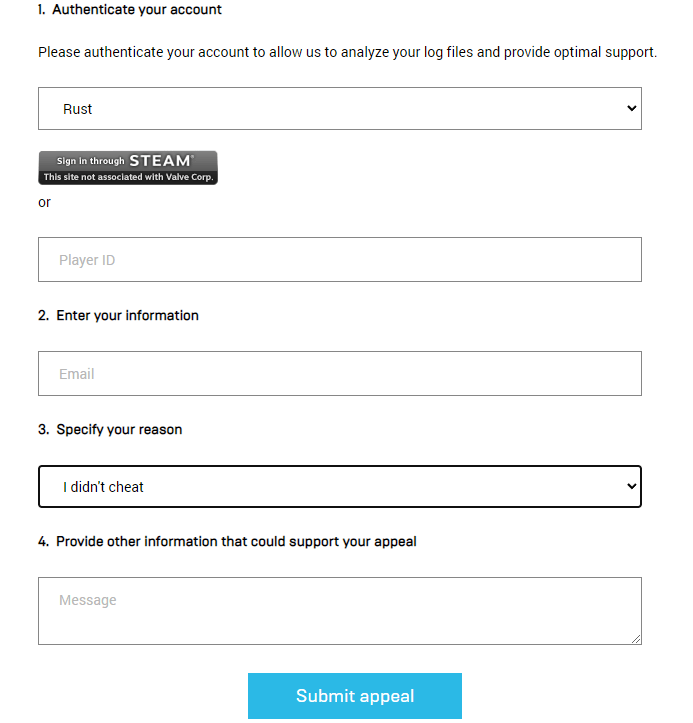
Once you’ve completed the form for your Rust account unban appeal, press the “Submit appeal” button under the form, and your ticket will be sent to their Support!
2. Facepunch Developer Rust Ban Appeal
In order to appeal a developer Rust ban, you must first get on the official Facepunch Studios’ Support page, which needs to be completed as such:
- input your account’s email address;
- select “Rust” under the “Product” list;
- choose your correct Operating System;
- enter a concise yet accurate Subject, such as “Rust ban appeal”;
- provide your correct SteamID or Steam profile;
- your description of the ban appeal can be the same as the one for EAC.
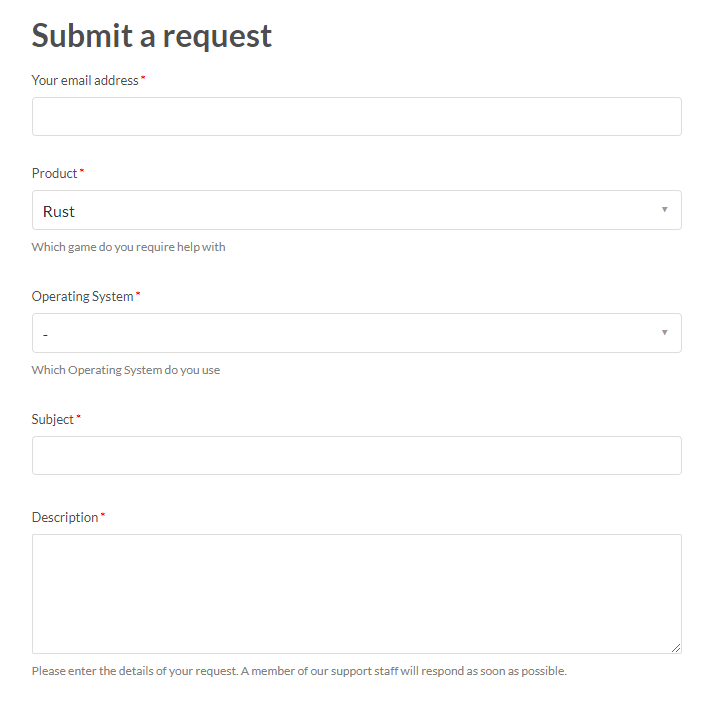
Once that’s done, simply press the “Submit” button underneath the form, and your appeal will be sent to Facepunch Studios for review.
Now that everything is done, wait until they review your Rust account ban appeal and get back to you with their reply via mail. Also, make sure to check the Spam folder as well! Good luck!
We’re here to give you the best help in order to recover your account!
Get Unbanned!
Comments 16
I got banned on facepunch rust and I have no idea why I haven’t played on it for over a year and came back no idea why
hi, i have the same problem, i have been banned for no reason….
I was banned and idk why I wasn’t on rust I come
Home then I’m banned and no reason was told
I was legit logged off a whole 3 months, and came back to a EAC ban i haven’t been able to play any games like bruh
Do you think that there’s any chance that i can get unbanned if i have proof that somebody stole my account and got me banned on it?
Author
Heya! Yup, that should be more than enough to get your ban overturned.
I was playing rust when I got kicked for no reason. I had to go do something, came back in 3-4 hours and I got gamebanned.
Me too
got account compromised no idea how (i have the mobile guard and have a antivirus) they said a 2 day ban and then a few hours later a permanent BAN! could i get the permenent one reversed if i have proof that i couldnt have even played rust when they perma banned me?
Author
Heya and sorry to hear that happened to you. Yes, they should overturn your ban following a review if they can confirm that the account has been compromised.
Was playing Rust then after 10 minutes got booted off and banned for no reason.
Hello, 7 years ago I played rust, someone stole my account and got me banned on it, I didn’t speak English very well by that time so I couldn’t do anything, right now I want to play rust and it has been around 1751 days from my ban.
Do you think I can do something about it?
Author
Heya and sorry to hear that happened to you! Yes, if your account has been compromised, it should be fairly easy to get that ban overturned. Please feel free to get in touch with us to further discuss your case.
i literally don’t know what was really happened back then what I remember was my PC just got infected with the malware and it was my antivirus who notify me im pleasingly sorry for what happened
Author
Sorry to hear that happened to you. Indeed, having your account compromised as a result of malware can lead to getting it banned.
Hi, I got banned for growth out of nowhere, I didn’t do anything wrong while playing. I requested an unban from EAC and they denied it and didn’t even give me a reason why.