
EAC and BattlEye can both issue bans directly – but developers can also push bans through either system for conduct, economy, or policy violations that have nothing to do with cheat detection. From the outside, both types look identical: locked account, same error message, same dead end.
That’s the problem. A ban delivered through EAC or BattlEye but issued by the developer can’t be overturned by the anti-cheat team – they’ll confirm they have no record of the detection and redirect to the studio. The reverse is also true: a ban that looks like a developer decision but was actually an anti-cheat flag needs to go the other way. Either mistake costs time and sometimes the appeal window itself.
The fastest way to check: EAC bans come with a Reference ID in the ban notification. BattlEye bans show as “BattlEye: Banned” at the client level. If either notice references a ToS violation, conduct issue, or economy flag rather than a technical detection, that’s a developer ban regardless of which system delivered it – and it needs to go to the game’s own support channel before anything else.
Diagnosing the source comes before writing anything, gathering evidence, or opening any form. Get it wrong and the ban appeal goes nowhere regardless of how well it’s structured.
Skip the Hassle - Get Expert Help Unbanning Your Account!
Get Unbanned!What Both Systems Actually Flag
EAC and BattlEye inspect running processes, memory changes, and network traffic simultaneously. The overlap in what triggers false positives is significant: unexpected DLL injections, outdated drivers, overlay software that hooks into the game process, VPN packet loss patterns, and automation tools all produce signatures that both systems flag.
EAC false positives are more commonly tied to overlay conflicts – Discord, OBS, GPU monitoring tools, and certain peripheral software like Logitech G-Hub have all triggered EAC flags across multiple games. Cheat Engine left running from a single-player session is one of the most documented EAC false positive triggers across the games it covers.
BattlEye false positives lean more toward driver-level issues and network anomalies. Outdated or unsigned drivers, VPN packet loss mid-session, and certain antivirus tools that interact with game memory have triggered BattlEye flags.
Both systems store log data for the account’s lifespan – meaning appeals submitted months after the ban can still be reviewed against the original detection data.
EAC Unban Guide
Getting unbanned from EAC requires the Reference ID from the ban notification – it’s the key that links the appeal form to the specific detection. Without it, the form can’t locate the case.
The appeal itself needs to address what EAC actually flagged. A full process list from the flagged session, an explanation of every tool that was running alongside the game, and an unedited gameplay clip for that session. If overlay software, peripheral tools, or Cheat Engine was open – even from a different game running in the background – name it and explain the context. EAC logs what’s running at the process level, and omitting something it already recorded creates a gap that’s harder to explain than just disclosing it.
HWID bans through EAC are game-specific in most cases – they don’t automatically carry over to every EAC-protected title. In severe or repeat cases, the flag can extend to other games, but that’s the exception rather than the rule. A new account on a hardware-flagged machine gets banned on first login in the affected game – the appeal needs to address the hardware detection specifically, not just the account.
How to Submit an EAC Ban Appeal
- Open the official EAC appeal form;
- Input the Reference ID (you can obtain this from the ban email or game console log when you get kicked);
- Select the game that issued the ban;
- If the game is on Steam you can sign in through Steam, otherwise enter the player ID requested by that title;
- Fill your name and the email tied to your game account.
- Choose the appeal reason.
- In the large text box write your ban appeal, explain the timeline, list attached evidence, and paste log highlights if helpful.
- Attach files, then press Submit appeal.
Once that’s filled in, make sure to press the blue “Submit appeal” button underneath the form, and your EAC unban appeal will be sent to their Support for review.
Make sure to keep an eye on the email address you’ve completed inside the form, as that’s how they’ll get in touch with you!
BattlEye Unban Guide
BattlEye’s appeal process doesn’t use a Reference ID system like EAC – the appeal goes through a contact form with the email tied to the game account or platform. The subject line should reference the specific game the ban is attached to, not just “BattlEye ban appeal.”
BattlEye’s detection focuses on cheat software, memory manipulation, and process-level interference. False positives tend to cluster around two things: driver-level conflicts and network anomalies.
Driver or overlay flags are the most common false positive source. BattlEye is particularly sensitive to unsigned or outdated drivers – updating or removing the flagged software before generating a fresh system scan is worth doing before submitting. Include the process list from the flagged session and an explanation of everything that was running alongside the game.
VPN and network anomalies are worth addressing explicitly if a VPN was active during the flagged session. BattlEye’s network traffic analysis can read VPN packet loss patterns as suspicious behavior. Include the IP range and the reason for using it – an unexplained network anomaly alongside a detection flag creates a compounding problem that’s easier to address upfront than after submission.
Beyond that, the appeal needs the same core as any anti-cheat case: what was running, why it wasn’t cheat software, and what the clean environment looks like now. One ticket, everything attached, follow-up inside the same thread only.
How to Submit a BattlEye Ban Appeal
- Go to BattlEye’s Support page and pick Ban appeals in the contact menu;
- Fill your name and the email that matches your game account or platform;
- Subject line example, “BattlEye Ban appeal”.
- In the message field write your ban appeal and list every attached file.
- Attach log files or clips.
- Accept the privacy policy, solve the captcha, press Submit.
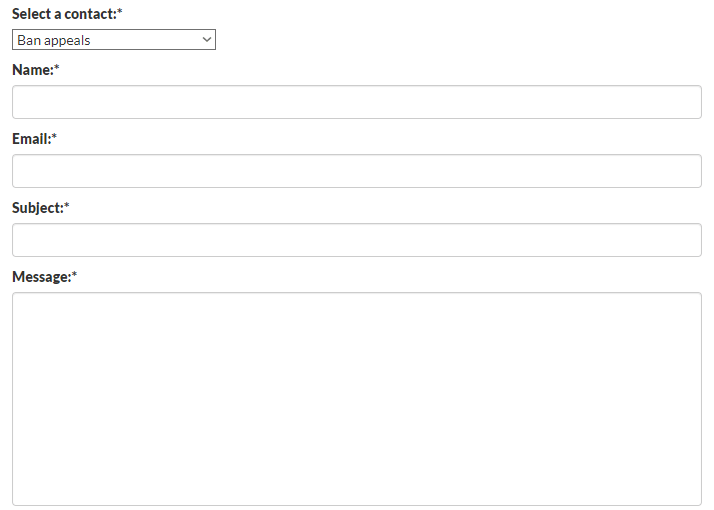
Ensure you’ve read and accepted the Privacy Policy and fill in the Captcha code then you can press the “Submit” button underneath, and your BattlEye unban appeal form will be sent for review!
We’re here to give you the best help in order to recover your account!
Get Unbanned!