
Regardless of how popular a game is, it still has its own dedicated playerbase, some of which, unfortunatelly might get banned in that particular game for various reasons.
That being said, a lot of the not-so-mainstream games out there either don’t have a dedicated support center for ban appeals, or if they do, it can take a bit to find it, and in the unfortunate event of finding your account banned, finding the proper contact channel can be quite a hassle.
With that in mind, we decided to cover a ban appeal guide for some of the most popular games, updated for 2025, in the event where you want to get in touch with a game’s support, but can’t find how to do so.
So, in somewhat of an alphabetical order, let’s go over the ban appeal guide for some of the most played games!
Albion Online Ban Appeal
In order to get unbanned from Albion Online, the only way of appealing it or otherwise contact Albion support is by sending an e-mail to [email protected].
When sending the Albion Online ban appeal, make sure to include as much information in regards to your ban, as well as to your account, so they can verify your ownership and identity as the account owner.
Once the Albion Online ban appeal is sent, make sure to also keep an eye on your mail’s Spam folder, as sometimes, based on your mail provider, their reply can end up in there!
Age of Conan Ban Appeal
Note: this is the same form and website for appealing an Anarcy Online ban!
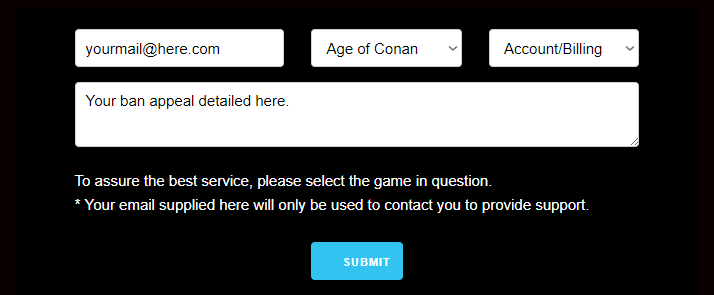
Although Age of Conan has an actual online form, it is essentially, still an e-mail based ban appeal.
What that means, basically, is that in order to get unbanned from Age of Conan, you need to go on the Funcom Support page and complete it accordingly, as such:
- your account’s registered mail address;
- select Age of Conan from the game list;
- choose “Account/Billing” as the issue;
- write your actual Age of Conan unban appeal and then press Submit.
Age of Wushu Ban Appeal
Same as for Albion Online, in order to get unbanned from Age of Wushu through a ban appeal, all you need to do is send them a direct e-mail to
[email protected] from your account’s registered mail address, as confirmed by their support page.
When sending the mail, make sure to provide as much accurate information as possible in regards to your Age of Wushu ban as well as to your ownership of the account, to further minimize the back and forth mails with verification questions.
Back 4 Blood Ban Appeal
The only way of getting unbanned from Back 4 Blood – or any other game for that matter, is by submitting a Back 4 Blood unban appeal, via WBGames Support center.
Thus, once you’re on their official Support website, click on the top right “Ask for Help” button, then choose “Ask for Help” once again in the issue form.
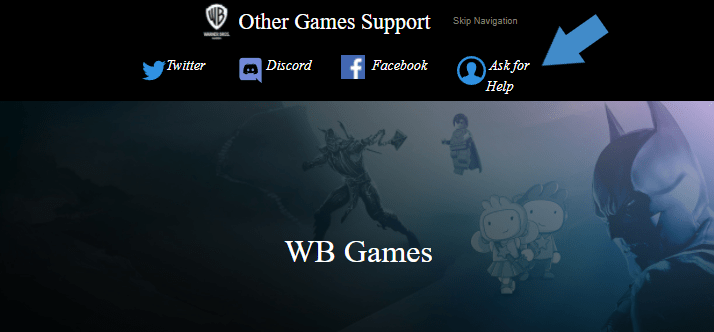
This will take you to the final Back 4 Blood unban appeal form here, which you need to complete as such:
- fill in your email address (preferably the same one you used for your now banned Back 4 Blood account), along with your name;
- select the correct platform on which you play Back 4 Blood;
- choose “Back 4 Blood” from the drop-down list under “WB Games“;
- under “Question Type“, pick “Ban Appeal“;
- input your in-game “Display Name“;
- write a concise and relevant subject, such as “Back 4 Blood Ban Appeal“;
- under “Description”, write your ban appeal and provide as much relevant information regarding your ban.
Once everything is in place, you can go ahead and click on the blue “Submit” button underneath the form, and your Back 4 Blood unban appeal will be sent to the Support Department for review.
Dying Light: Bad Blood Ban Appeal
Bans for both Dying Light along with Dying Light: Bad Blood can be appealed through the same support form, namely via Badblood Support.
Once you get on the above mentioned unban appeal form for Dying Light, choose the game you want to get unbanned from under “Product Name”, then proceed to entering your account’s mail address.
Complete the subject behind your request, such as “Appealing a ban”, then fill in the description with the information as to why you believe you got banned from Dying Light, as well as what happened that got you banned.
Attach any relevant files, if any, give your consent for processing your personal data, complete the Captcha code then submit your Dying Light unban appeal and wait until you hear back from them via mail.
Friday the 13th: the Game Ban Appeal
Friday the 13th: the Game is very well known for its ban waves, as well as for its unban wave, thus giving certain players accused of cheating a second chance.
As for the unban appeal, Friday the 13th: the Game has a pretty straight forward process, which requires you to submit a mail to [email protected].
That’s all, although do make sure to input as much information in regards to your ownership and your ban to reduce the time required for your case to reviewed.
Halo Infinite Ban Appeal
To get unbanned from Halo Infinite, you must submit a ban appeal via Halowaypoint Support, which you need to complete as such:
- choose “Halo Safety – Ban appeal” for the reason;
- select “Halo Infinite” as the game you’re appealing for;
- input your Halo Infinite banned account’s Gamertag – while this is optional, it’s recommended to be filled in for a faster identification;
- write a concise yet relevant subject, such as “Halo Infinite ban appeal”;
- fill in your ban appeal in the description field;
- upload/attach any relevant files, if any (optional).
Insurgency: Sandstorm
If you got banned from Insurgency, then at least you’re in luck in regards to their Support and how to appeal an Insurgency ban.
All you need to do is to go on the Focus Home support page, and fill in the “Can’t find a solution?” form on the left side of the screen.
Input your e-mail address behind your account and choose Insurgency from the drop-down list of “Looking for help with”.
Choose your operating system then start writing your Insurgency unban appeal under “Describe your problem”.
Provide as much information as you can in regards to your situation and as to what do you think happened that got you banned from Insurgency, then complete the Captcha field and press submit.
LotRO Ban Appeal
To start your Lord of the Rings Online ban appeal process, you must first go on their LotRO Support page here, and complete the form as such:
- choose “My account is banned or suspended” in the first field;
- input your account’s registered email address, as well as a relevant subject, such as “LotRO Ban Appeal”;
- pick your preferred language (such as English), then choose the platform you play on (such as PC);
- fill in your username – make sure to not make any typos here;
- write your ban appeal in the description field.
New State Ban Appeal
To get unbanned from New State, you need to submit a ban appeal via Krafton Support. Here’s how:
- Select your platform: Android is the default; tap iOS if you play on an iPhone.
- Enter the account’s registered e-mail address.
- Under Category, choose Account Ban Appeal (or Account if that’s the nearest option).
- Fill in required details – IGN, Player ID, device model, and any error code displayed in-game.
- Describe the issue clearly in the “Describe your problem here” box: date of the ban, what you were doing, and why you believe the action was in error. Attach screenshots or receipts if relevant.
- Submit the ticket and monitor that same e-mail (plus Spam) for Krafton’s reply – expect a response within three to five business days.
Once Human Ban Appeal
For the time being, NetEase has a pretty straight-forward Once Human ban appeal system, in the form of it being just an email address.
That said, here’s how and where to send it:
- compose an email to [email protected] from your account’s registered email address;
- input a concise subject, such as “Once Human ban appeal“;
- write your ban appeal in the in the email body.
Raid: Shadow Legends Ban Appeal
The entire Raid: Shadow Legends unban appeal will take place on Plarium’s Official Support page.
Once you’re on it, you’ll need to complete the fields as such:
- choose “Game account access” under category;
- input a relevant subject, such as “Raid: Shadow Legends ban appeal”;
- fill in your account’s registered email address;
- select the mobile platform on which you play the game;
- write your device model, for example Samsung S10 or iPhone X;
- enter your in-game ID;
- write your ban appeal in the “Description” field;
- attach any relevant files or screenshots, if any.
Rogue Company Ban Appeal
- Go to the Hi-Rez Support page and tap the blue chat bubble.
- Select Messages → Ask a question.
- Enter your registered e-mail, type “Rogue Company ban appeal”.
- If prompted, pick Suspension / Ban.
- Provide username & in-game name; press Enter.
- Select Game: Rogue Company, Platform: Steam/Epic/etc.
- Detailed description: Write your ban appeal here.
Roblox Ban Appeal
Roblox has a pretty straight forward unban appeal form as well, without requiring you to log into the account or any other hassle.
The support link where you can appeal to get unbanned from Roblox is right here, consisting of a form that you need to fill in. So, let’s get right to it!
The first part of the form consists of you verifying your account ownership information, which can be done by writting your First Name, Mail and Username with which you play Roblox.
The second part of the form is the actual Roblox ban appeal, which should be completed as such:
- choose the device on which you’re playing Roblox (such as PC);
- select the category describing your issue, namely “Moderation -> Appeal Account or Content“;
- write the ban appeal under the “Description of issue” form, and make sure to include as much relevant and accurate information as possible in regards to your Roblox banned account.
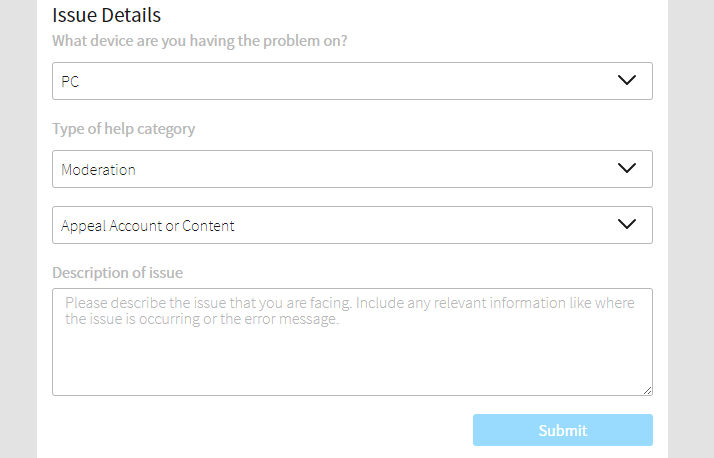
Once you’ve done all of the above, simply press the blue “Submit” button on the bottom right underneath the form, and that’s all. Wait until Roblox support gets back to you, via e-mail, so make sure you also check the Spam folder.
SCUM Ban Appeal
SCUM’s ban appeal needs to be done through EAC (Easy Anti Cheat), just like in the case of Rust, for example.
That means that you need to go on this EAC form right here, and start by authenticating your account with the help of signing in through Steam.
Once that’s done, you can proceed to enter your information, of which the only mandatory fields are the First name and Email.
Continue by choosing the reason for which you’re appealing to get unbanned from SCUM, by selecting the option that applies for your particular case, out of the 4, then start writing your SCUM ban appeal under the information field.
Ensure you’re coming up with as much correct and relevant information as you can about your case, along with what you think could have happened, to be sure that EAC has all the details required to be able to review your SCUM unban appeal.
Lastly, submit your appeal then wait until they get back to you!
SWTOR Ban Appeal
EA runs all Star Wars: The Old Republic suspensions, so you have to go through EA Help, not an in-game ticket.
Log in to the official EA SWTOR Support page, and select “Email Us”, then fill the form:
- Your name and account email address;
- Select your platform (PC / Steam);
- Subject – “SWTOR Ban Appeal”.
- Explain why the ban is wrong, list the date it happened, and attach any proof (e.g., logs, purchase receipt).
Submit and watch the inbox of your EA-linked e-mail; replies land there within two to four business days.
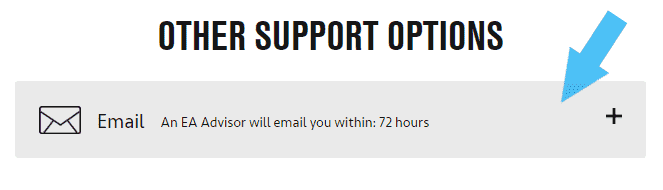
Team Fortress 2 Ban Appeal
Just like with Dota 2, the way of appealing to get unbanned from Team Fortress 2 is by completing this form right here, which is the TF2 Team contact form.
Since it’s quite a simple and straight forward form, make sure to double check that the mail address you’re writing is the one you’re also using for TF2, otherwise there will be no way for Support to get back to you or verify your identity in regards to the account ownership.
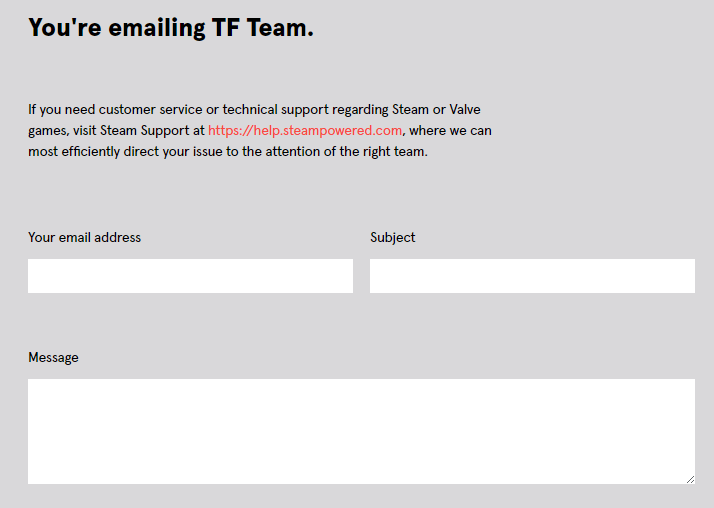
As for the TF2 unban appeal, complete that in the “Message” field as thoroughly detailed as possible in regards to what you believe happened that got you banned from TF2, so the Support team has all the info when reviewing your appeal.
The Finals Ban Appeal
To get unbanned from The Finals, you must submit a ban appeal to Embark Games Support.
Here’s how to do that:
- Once logged in, click the red chat bubble (lower-right corner).
- Select “Appeal Ban or Restriction” → “In-Game Ban.”
- When help articles appear, hit “No, I need to talk to someone.”
- Enter your name; the e-mail field appears next – type the account’s registered address.
- Pick “I cannot access the game and think I was banned.”
- Fill in account details – username, platform, and ban error code (e.g., TFLA0004).
- Paste a concise appeal explaining the ban trigger and any supporting proof, then Send.
- Watch the same e-mail (and Spam) for Embark’s reply – usually within a few business days.
Warhammer Ban Appeal
Based on the region you play in, to get unbanned from Warhammer, you need to send your ban appeal via mail, to:
- for Europe – [email protected];
- for US – [email protected].
Make sure to send the mail from your Warhammer’s account mail as well, thus confirming your identity as the account owner, and add as many details to help the investigation and review as you can.
Wuthering Waves Ban Appeal
For the time being, the only way to reach Kuro Games Support is via their email address. Thus, in order to appeal your banned Wuthering Waves account, you must:
- compose an email to [email protected] from your account’s registered email address;
- input a concise yet relevant subject, such as “Wuthering Waves Ban Appeal“;
- write your ban appeal in the email body.
Attach any relevant files, screenshots or documents (if any), then send off the email.
Make sure to keep an eye on your Spam folder as well, as once they have an answer for you, it’ll be sent to your email address.
Conclusion
This is it! We tried to include as many popular games as we could in here, although it goes without saying that we have most likely missed a few.
We’ll constantly edit and update this post with changes to the ban appeal forms or by adding new games, so keep an eye on that if you’re interested in multiple games.
Also, should you require help with a particular game that you don’t know how to submit a ban appeal for, please feel free to let us know either in the comments or in the contact form, and we’ll cover it and get back to you!
We’re here to give you the best help in order to recover your account!
Get Unbanned!