
If you’re looking to get unbanned from Escape from Tarkov, the most important thing is to figure out who issued the ban and what likely triggered it before you send anything.
That matters because EFT bans usually fall into two different categories:
- Battlestate Games (developer) bans;
- BattlEye bans.
And the appeal route is not the same.
A lot of weak EFT appeals fail for a simple reason: they are too vague. They say almost nothing about the trigger, include no useful logs, and don’t explain why the flag may be wrong.
A stronger appeal is much simpler:
- identify the likely cause;
- pick the right support route;
- attach the right evidence;
- keep the story clean.
First, Work Out What Kind of EFT Ban This Is
Before you write your appeal to get unbanned from EFT, ask yourself this:
Is this a Battlestate ban or a BattlEye ban?
A Battlestate Games ban is usually tied to account-level enforcement, support-side review, or issues handled directly through Escape from Tarkov support.
A BattlEye ban is tied to anti-cheat detection, and if that is your case, the appeal usually belongs with BattlEye rather than only with Battlestate.
If you submit the wrong kind of appeal to the wrong place, you can waste time before the real review even starts.
What Usually Gets EFT Accounts Banned
Based on our own casework, these are the most common reasons behind EFT bans:
- cheating or third-party tools – 46%
- real-money trading (RMT) – 19%
- toxicity, harassment or threats – 11%
- boosting or account sharing – 9%
- compromised account – 8%
- exploit or glitch abuse – 5%
- other reasons – 2%
The Ban Types We See Most Often
Cheat or third-party tool flags
This is the biggest category by far. It can include:
- obvious cheats
- suspicious software hooks
- unusual system behavior around the game
- anti-cheat detections tied to the device (including false positive bans)
RMT or suspicious trades
This usually involves:
- high-value item movement
- unusual trade patterns
- flea market activity
- “gifts” that look like purchased rubles or items
Compromised account situations
These tend to happen around:
- suspicious logins
- password or email changes
- account access during a wipe or active period
- actions taken by someone else on the account
Boosting, account sharing, or VPN-related patterns
This can overlap with:
- sudden location changes or VPN usage
- inconsistent login history
- abnormal account activity
- different users playing the same account
Which EFT Bans Are Easier to Overturn?
Some Escape from Tarkov bans are easier to overturn than others.
Stronger categories
Compromised account
These often do best when the timeline is clear and you can show:
- login alerts
- 2FA proof
- email change logs
- suspicious IP history
False cheat flag
These can be strong when you have:
- BattlEye GUID or ban reference
- raid timestamp
- system logs
- a clear explanation of what was running at the time
More mixed categories
RMT suspicion
- more case-by-case
- stronger if you can show trade context
- better if there are screenshots, receipts, or chat context
Toxicity
- better if it was not a hate-speech type case
- stronger when context exists
Exploit or glitch cases
- usually harder
- strongest when supported by patch notes, video context, or bug-related history
What to Save Before You Open a Ticket
Save the account details, and write down:
- the date and approximate time of the ban
- your region
- your account email
- your in-game details if relevant
- any earlier ticket numbers
Save the useful files – depending on the case, helpful proof can include:
- BattlEye global ban ID from the kick message
- raid ID and timestamp from the flagged match
- system scan logs or a zipped DxDiag
- trade or flea market screenshots
- authenticator logs
- email-change history
- video clip showing normal play
- previous support replies
Save the context too
Also note:
- what you were doing shortly before the ban
- whether a VPN was active
- whether your IP changed
- whether anyone else had access to the account
- whether any high-value trade happened recently
How to Get Unbanned from Escape from Tarkov
There are two types of bans in EFT, namely:
- developer ban (Battlestate Games);
- anti-cheat ban (BattlEye).
Below, we’ll go over both of them, although the most frequent type of EFT ban is the BattlEye one.
EFT Developer Ban Appeal
To submit an Escape from Tarkov ban appeal, you must get on the EFT Support page.
Here’s how to do that:
- Log into your banned Escape from Tarkov account;
You can do that by clicking the “Login” button on the top-right header section of their website.

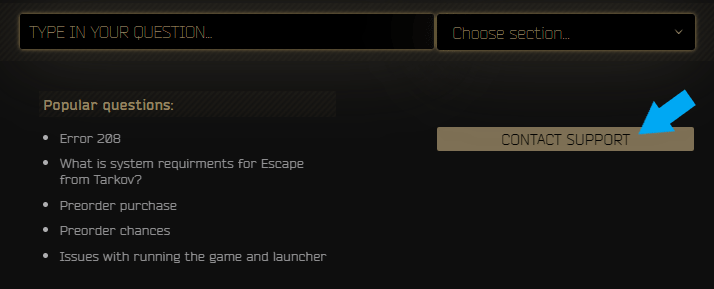
- Click on “Contact Support”;
After logging into your account, the website will refresh and the button will now appear.
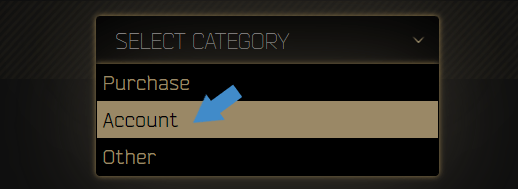
- Select “Account” as your issue;
Depending on the nature of your Escape from Tarkov ban, you can also go with “Other”.
- Write your Escape from Tarkov ban appeal;
State the nature of your ban, what were you doing at the time, why it was wrongfully applied, as well as provide any helpful evidence. Or, save time and stress and have us craft the perfect appeal for you!
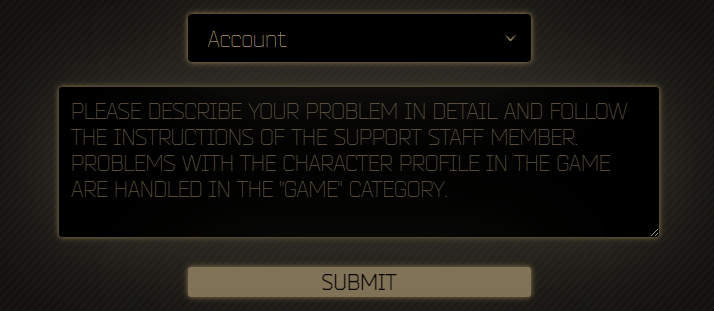
Once all of the above are done, you can go ahead and press “Submit”, and your Escape from Tarkov unban appeal will be sent to Support!
Additionally, you can also submit the Escape from Tarkov ban appeal as a mail to [email protected], should you no longer have access to your account.
EFT BattlEye Ban Appeal
If you’ve been banned by BattlEye, you need to submit a BattlEye ban appeal instead for your EFT account.
To submit an EFT BattlEye ban appeal, you need to:
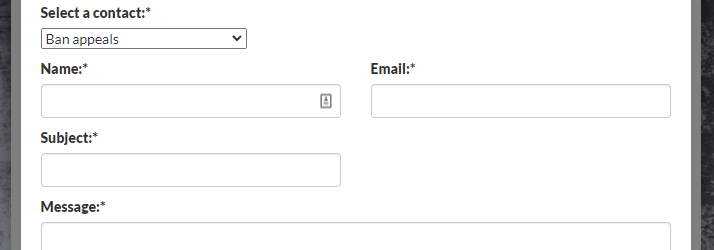
- go to BattlEye’s Support page here;
- pick “Ban appeals” under “Select a contact”;
- fill in your name and email address;
- input a concise subject (such as EFT Banned Account);
- write your EFT ban appeal;
- agree to their terms and complete the captcha challenge;
- press the Submit button.
Build the Appeal Around 3 Things
A solid EFT ban appeal usually works best when it answers just 3 questions:
1. What happened?
Keep the timeline short and clear:
- when the ban happened;
- what you were doing before it;
- whether anything unusual happened on the account or device.
2. What likely triggered it?
Be direct about the most likely cause:
- BattlEye flag;
- suspicious trade or RMT;
- compromised account;
- VPN or IP jump;
- shared access;
- software running in the background.
3. What proof are you attaching?
Only include files that actually support your case, such as:
- raid timestamps;
- logs;
- trade screenshots;
- email or login history;
- system scans.
That’s usually enough. You don’t need a dramatic message, you need a clean one.
If Your Case Looks Like One of These
BattlEye-related
Lead with the ban ID, game name, raid timing, and system details.
RMT-related
Show the trade context, flea market history, and anything that explains the transfer.
Compromised account
Include login alerts, email-change logs, 2FA proof, and unusual IP history.
VPN or location issue
Explain the reason for the IP change clearly instead of leaving it unexplained.
Last Checks Before Sending
Before you submit:
- make sure the timeline is accurate;
- attach files instead of promising to send them later;
- mention VPN use if it matters;
- avoid duplicate tickets;
- check spam after sending.
One clear appeal is almost always better than several rushed follow-ups.
We’re here to give you the best help in order to recover your account!
Get Unbanned!