
If you got your account banned, this article’s for you! Below, we’ll cover a step-by-step guide on how to submit a ban appeal to get unbanned from The Finals!
The Finals is a free-to-play FPS developed by Nexon subsidiary Embark Studios. The game places a spotlight on team-based matches unfolding in maps with a destructible environment, challenging players to leverage the dynamic surroundings strategically.
While its gameplay can be at times similar to Apex Legends, it’s set against the backdrop of a televised virtual combat game show, with holographic crowds and insightful commentary from various hosts during gameplay.
But, if there’s one thing all FPS and Battle Royale games have in common, that’s the “shortcuts” some players take in order to secure their victory.
What Gets You Banned in The Finals?
If you have no idea why your account got banned from The Finals (usually code TFLA0004), here are the most common reasons, listed in their anti-cheating FAQ as well:
- cheating software of any kind (ESP, radar, aimbot, wallhack, scripting, no recoil);
- account selling, sharing or boosting;
- macros, regardless of them being part of your mouse or keyboard;
- toxicity, griefing and any form of negativity towards other players;
- lag switching and any other form of network connectivity manipulation;
- farming and repetitively accumulating resources;
- win-trading, as in, allowing the other team to defeat you;
- using any glitches or exploits to your advantage, similarly to Fortnite bans.
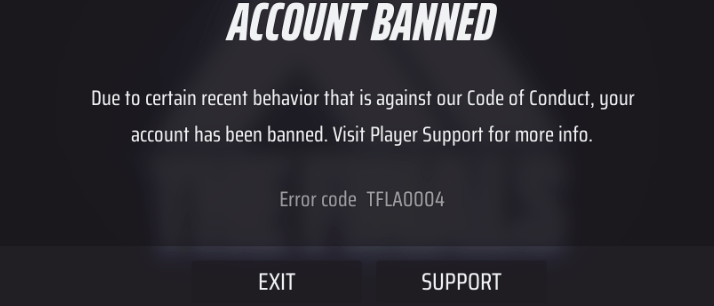
It’s worth noting that The Finals uses EAC to ban players, on top of other not-disclosed anti-cheating software. Thus, as with any anti-cheating solution, false positive bans can and do happen.
In fact, Embark Studios confirms it themselves, in their anti-cheat FAQ.

But, to decrease the chances of landing a false The Finals ban, here are a few tips:
- don’t run work related or heavy software while playing;
- keep an antivirus software running at all times and use a unique password for your account;
- avoid attracting reports of any kind, especially if you can prevent them;
- steer clear of other players that might want to win-trade;
- don’t use any modded controllers or drivers to improve your gameplay.
Now that we’ve established that, let’s check out how you can get unbanned from The Finals!
How to Get Unbanned from The Finals
Submitting a ban appeal for The Finals is not a very straight forward process, although it is similar to appealing ARC Raiders bans, as they share the same developer. Or, at least, not for the time being.
To submit a ban appeal in The Finals, you must:
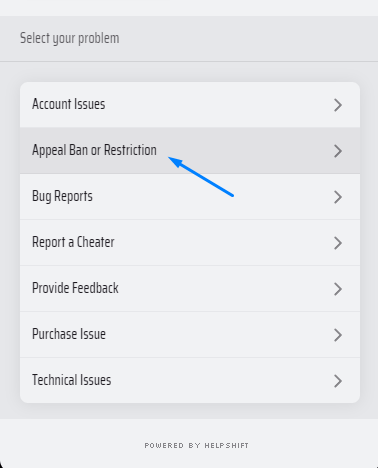
- Go to their Support Center here, and click on the red chat bubble in the bottom right;
From the list that pops up, click on “Appeal Ban or Restriction“, then choose “In-Game Ban“.

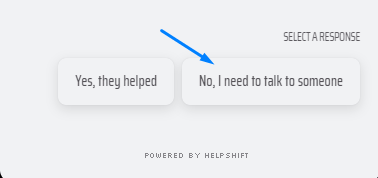
- Click on “No, I need to talk to someone” in the bottom right;
The resources above are merely articles, and not chat options.

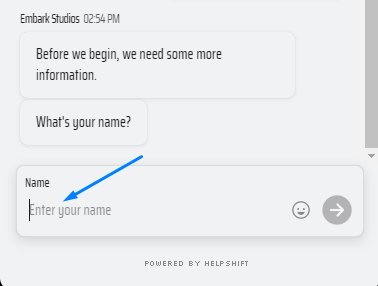
- Input your name and email;
The email field will follow after writing your name.

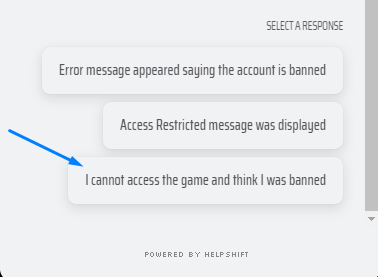
- Select the situation you’re facing;
For a The Finals banned account, choose the 3rd option, namely “I cannot access the game and think I was banned“.

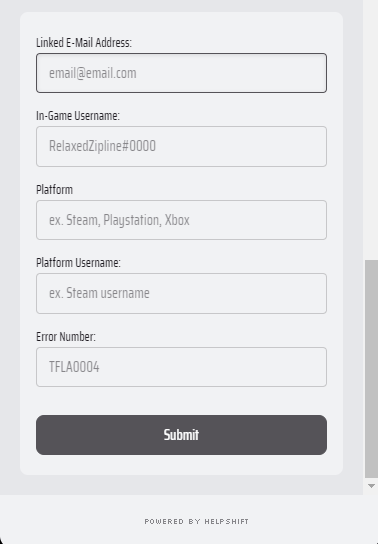
- Fill in your account information;
That means your account’s registered email address, your in-game username, platform you’re playing and your username, as well as the ban error number you’re seeing (such as TFLA0004).

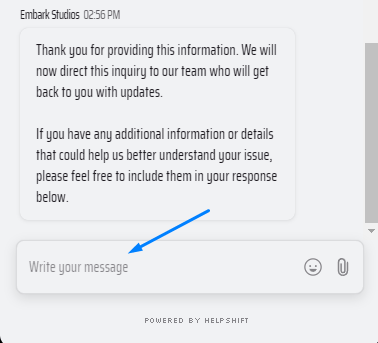
- Write your The Finals ban appeal in the chat box;
Write all relevant information regarding your ban – timing, what you were doing, any work related software you were running, as well as why the detection was wrongful. Or skip the hassle and let us handle it for you!

Once that’s done, simply press send on the chat message and your ban appeal will be sent to Embark Studios. You’ll get notified via the same email address (the first one from step 3) once they have an answer, so keep on eye on it (as well as on your Spam folder)!
That’s it! Hopefully our guide was helpful with regard to successfully appealing your The Finals banned account!
We’re here to give you the best help in order to recover your account!
Get Unbanned!