

In this guide, we’ll go over how you can get unbanned from Teamfight Tactics by submitting a ban appeal, should you ever find yourself in that unfortunate situation.
Teamfight Tactics is a PvP auto chess type game, developed by Riot, which has managed to secure a monthly player count of 33 million. This doesn’t just make the game very popular, but very competitive as well, since you’re always battling other players.
Now, as we know with popular PvP games, they also come with a strict ruleset that should not be broken, otherwise you risk losing your account, as in, getting permanently banned.
With that in mind, let’s first go over the reasons for which you can get your account banned from Teamfight Tactics!
What can get you banned from TFT?
Although Riot shares the same Terms of Use page for both League of Legends and Teamfight Tactics, below are some of the most common reassons for which you can get your Teamfight Tactics account banned:
- toxicity, harassment, insulting, spamming and other similar behavior issues towards another player or the community;
- cheating, such as any third party software that’s designed to give you an unfair advantage, such as bots, autoclickers, scripts;
- boosting, either buying or selling them, as well as sharing your account;
- selling or buying accounts.
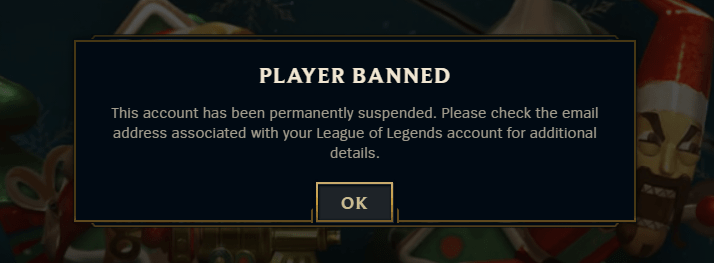
Can You Get Unbanned from Teamfight Tactics?
While there is no actual answer to apply to all cases and players, yes, getting unbanned from TFT is a possibility, but of course, there are certain circumstances that can make a case easier or harder to overturn following a Riot ban appeal.
For example, a banned TFT account on which you’ve already sent a bunch of appeals or were offensive when talking to Riot Support (which is most definitely a deal breaker) is much harder to overturn as opposed to an account where you’ve never appealed the ban yet.
Now that we’ve established some of the most common offenses that can get you banned in Teamfight Tactics and whether or not you have a chance to get unbanned, let’s now go over what you can do in that event, and how to submit a Teamfight Tactics unban appeal!
How to Submit a Teamfight Tactics Unban Appeal
Since both games are developed by Riot, Teamfight Tactics shares the same form as the one for the LoL unban appeal.
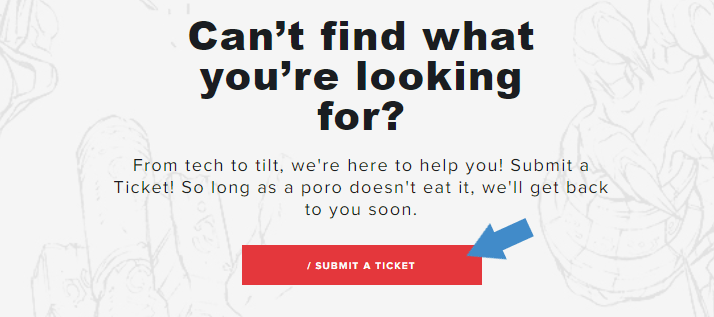
In order to proceed with your Teamfight Tactics unban appeal, you must first go on the Riot Games Support page here, and click on “Submit a ticket“.
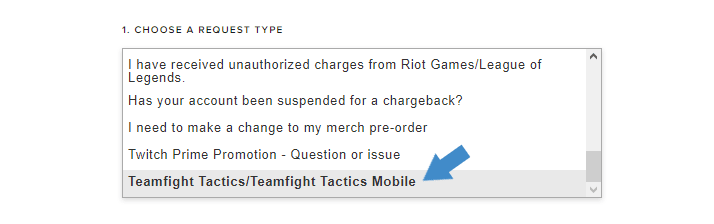
Afterwards, you need to select “Teamfight Tactics / Teamfight Tactics Mobile” from the drop-down list, under “Choose a request type”.
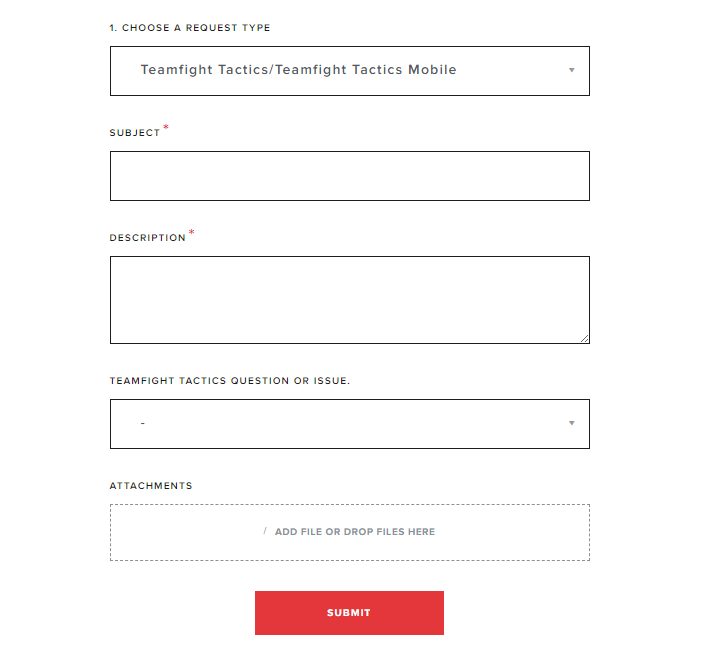
This will prompt you to log into your Riot account if you weren’t logged in yet, after which you’ll finally land on the actual Teamfight Tactics unban appeal form, which you’ll need to complete at such:
- input a relevant and concise subject, such as “TFT ban appeal“;
- select “Unable to play” under “Question or issue”;
- attach any relevant files, if any;
- and lastly, for the Description field, that’s where we come in handy, should you require our professional and customized Teamfight Tactics unban service designed to get you unbanned from TFT.
Once all of the above fields are completed, you can just go ahead and press the red “Submit” button, and your Teamfight Tactics unban appeal will be sent to Riot Support for review.
Make sure to keep an eye on your account’s registered email address, as that’s where you’ll be notified once they have an answer for you. Best of luck!
Need help with a banned TFT account?
We're here to give you the best help in order to get you unbanned from TFT!
Get unbanned!