
In this article, we’ll cover the steps required in order to submit a ban appeal in order to get unbanned from New World!
Dubbed as the most likely WoW killer, New World is one of the newest MMORPGs to have been released, bringing a ton of new and different gameplay content to the genre.
However, apart from a completely different gameplay style and focus, New World also puts a lot of emphasis on crafting and gathering. Thus, making them very important aspects of the game, both of which have unfortunately become quite obsolete in other popular MMOs.
On top of that, New World is an amazing MMORPG game for both types of players, the ones that like to play by themselves as well as for those that like to be grouped up with friends, leaving little to no advantage to be in a party (unless you’re doing an elite quest or dungeon).
Another huge bonus for New World is that a very large number of popular Twitch streamers love the game as well, making it one of the top streamed games, which is great because it’s the type of game that’s just as awesome to play as it is to watch.
That said, as with every popular online game out there, especially within the MMORPG genre, some players might step outside the rules to look for shortcuts when it comes to either farming materials, leveling up characters or getting the best possible gear, which can and most likely will lead to them getting their account banned from New World.
With that in mind, let’s go over the most common reasons for which a player can get banned in New World, as well as what you need to avoid doing to ensure that doesn’t happen to you!
We’re here to provide you with the best support in order to get you unbanned!
Get Unbanned!What Can Get Your Account Banned from New World?
While it’s best to read both the Terms of Use and the Code of Conduct to be absolutely certain that your actions don’t go against them, below are some of the most common reasons for which a player can end up with their account banned from New World:
- cheating, through using bots, third party software, automation tools (including automated mouse / keyboard macros);
- exploiting bugs, glitches and other such unintended features, especially to gain an advantage;
- real money transactions for in-game goods;
- buying, selling or sharing accounts, for any reason;
- toxicity, as well as any other form of negative, hateful or harassing behavior.
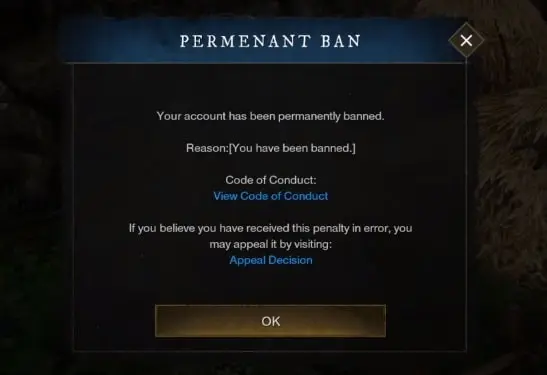
And, while most of these reasons are similar to those that can get you banned from WoW, being typical for a MMORPG, you’ll be surprised that New World shares a few with games outside its genre.
Similar to Apex Legends bans as well as with PUBG bannable offenses, you can get banned from New World for using aimbot software or ESP. Yup, you read that right.
Since many New World spells require aiming, cheat developers have created the tools above in order to perfectly land all of your abilities.
Regardless, so both you and your fellow players have the best time in-game, make sure to be on your best behavior when interacting with others, and just steer away from anything that could be bannable.
If you do however end up finding a bug or a glitch, especially something that could be exploited, don’t make use of it and go ahead and let developers know by using the Submit Feedback function in-game (press Esc and you’ll find it under Game Menu).
Now, if you do somehow end up banned, let’s see whether or not you have a chance at getting your account unbanned from New World!
Can You Unban a New World Account?
Although there’s no particular answer that can apply to every situation or ban reason, you can get your New World ban overturned.
This depends on a few circumstances, such as the gravity of your alleged offense, the number of times you’ve appealed the ban already as well as your behavior upon appealing the ban.
For example, if a player is banned for extreme toxicity and hateful conduct, said player stands close to zero chances of having their ban overturned. This is also a situation where we cannot be of help either.
On the other hand, with online competitive large games such as New World, there’s always room for false positive bans, as well as automated system issued bans as a result of false reporting.
In fact, the former is exactly what happened to popular Twitch streamer AnnieFuchsia when she decided to milk an in-game cow. Of course, her New World ban was removed since it was obviously applied by mistake, but that goes to show that this is something that can happen to anyone.
All in all, if you weren’t banned for extreme toxicity, and if you haven’t already appealed the ban multiple times, you might have a decent chance at having it overturned. Regardless, if you’d like to get a more accurate answer to this question based on your particular case, please feel free to get in touch with us!
With that in mind, let’s now move to probably the most important part of this article, namely how to submit a ban appeal in order to get unbanned from New World!
How to Get Unbanned from New World
This process is similar to the Lost Ark unban appeal.
Here’s how to submit a New World ban appeal:
- Go to their official website here and select “New World”;
At this point, you can also log into your Amazon Games account.
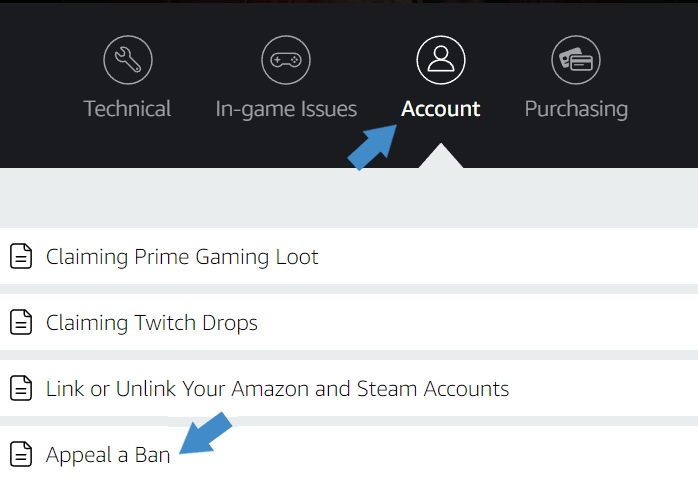
- Click on “Account”, then select “Appeal a Ban”;

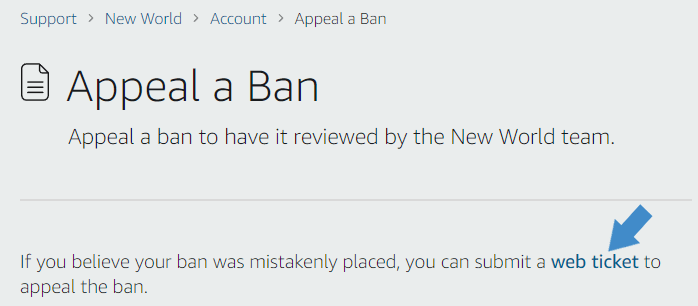
- On this next page, click on the highlighted “web ticket” text;
This will take you to the New World ban appeal form.

- Leave the subject as it is, namely “New World – Account: Appeal a ban”;
Unless your issue is different, in which case you can change it.
- Input your character and server name;
This is used to better locate your account and issue.
- Provide any screenshots or logs, if any (optional);
Feel free to skip this field if you don’t have any exonerating evidence.
- Write your New World ban appeal;
We’ve got your back on this one! Since 2015, we’ve successfully overturned countless similar bans with our customized and professional unban service, designed to get you unbanned from New World.
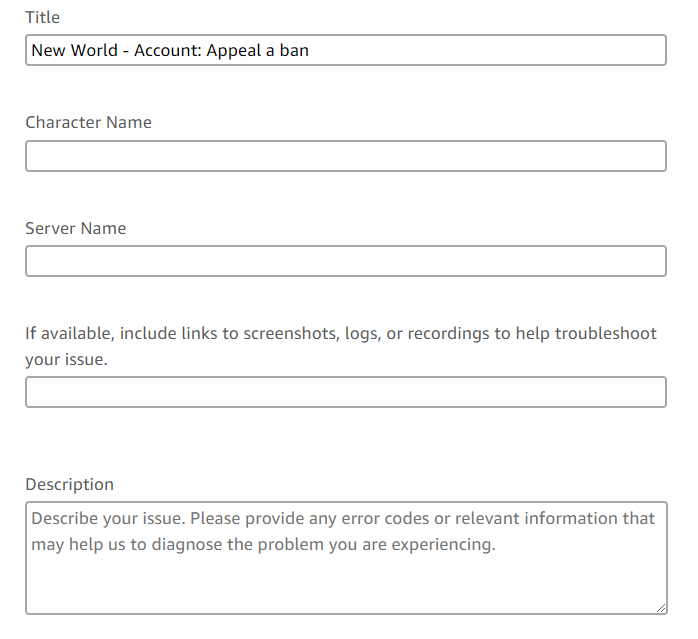
Once that’s completed, all you need to do is click the “Submit ticket” underneath the form, and your New World ban appeal will be sent to their Support department to review it.
You’ll likely get a notification email on your Amazon account’s registered email address when they have an answer, so make sure to keep an eye on it, as well as on its Spam folder.
That’s it! Hopefully our guide was helpful with regard to removing your New World account ban, and if you ever require our help, we’re here for you!
Need help getting unbanned from New World?
We're here to give you the best help in order to get you unbanned!
Get unbanned!